


Mobile Link for Generators
4.63.67K Reviews
App Specs
- Version
- 3.17.0
- Updated On
- License
- Free
- Downloads
- 500,000+
- Developer
- Generac Power Systems, Inc
- Categories
- Lifestyle
- Platform
- Android
Screenshots
 Analysis by AppCompare
I find a generator app most useful when it turns occasional checks into a calm, repeatable routine—not when it encourages me to stare at a dashboard all day. Mobile Link for Generators is aimed at people who want to check a compatible generator from a smart device, particularly when the equipment is installed somewhere inconvenient to reach. Its value is practical: a quick remote status check can help me decide whether I need to investigate in person, rather than making every concern an unnecessary trip outside.
Who benefits from having a remote check
This Lifestyle app makes the most sense for a homeowner who depends on a generator during outages, or for someone who wants to keep an eye on equipment at a second property. It can also suit people who camp with a compatible setup, although the usefulness depends on having a working connection and supported equipment. If your generator sits close by and you prefer to inspect it directly, a phone dashboard may add little to your routine.
It is made by Generac Power Systems, Inc, so the first practical question is compatibility, not whether the interface looks appealing. Before building a routine around it, I would check that the specific generator and its connected equipment can use Mobile Link. A familiar brand name alone is not enough reason to assume every model will work. That small check can save the frustration of downloading an app and expecting it to monitor equipment that cannot pair with it.
A useful outage-day routine
Picture a stormy evening when the household loses power. Rather than walking out in the dark just to see whether the generator is operating, I would use the app for an initial status check, then treat any alert or unexpected reading as a prompt to decide what to do next. The distinction matters: remote access makes checking easier, but it does not remove the need to follow safe practices or inspect the equipment when a physical problem may be involved.
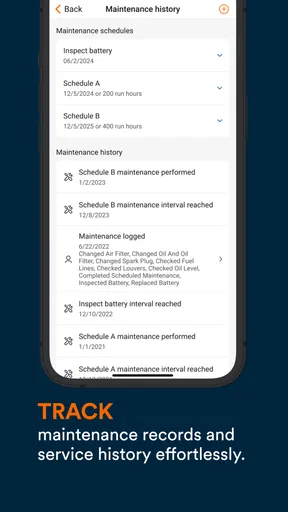
For a less urgent routine, I would check in after a scheduled test or when preparing for a season in which outages are more likely. Looking at the same status information each time helps me notice when something has changed, while a maintenance reminder can keep a basic service task from slipping past. I would still keep any maintenance notes or service paperwork that matter to me; an app reminder is useful, but it should not become my only record of care.
Getting Started with Mobile Link
First things first, setting up Mobile Link for Generators is a breeze. The app is available for both Android and iOS, so you won’t be left out regardless of your smartphone allegiance. After downloading, you'll need to pair it with your generator. Don’t worry, the app guides you through the process with clear instructions. I was up and running in no time.
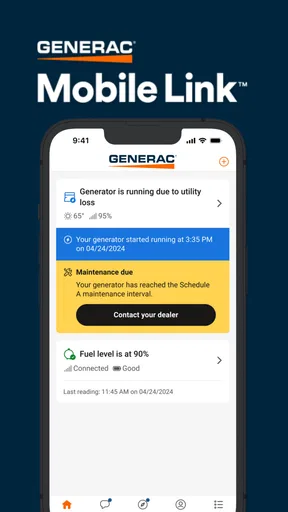
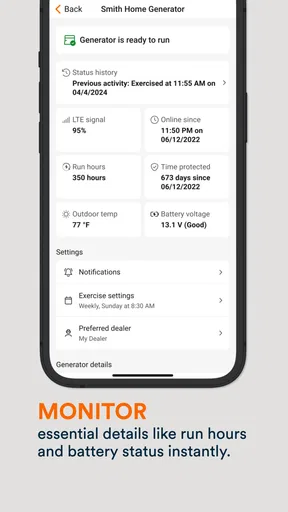
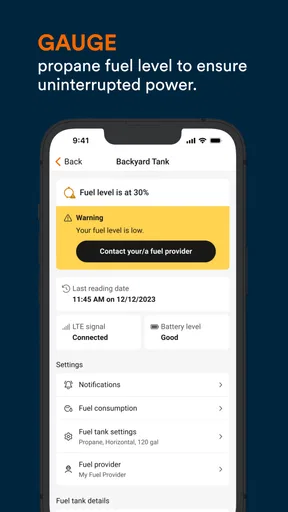
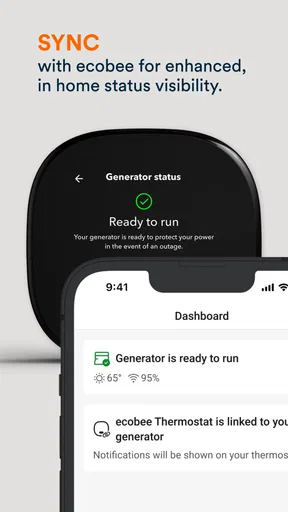
Once connected, the app’s interface is straightforward. You get a dashboard that displays critical information about your generator's status. Battery level, fuel status, and maintenance alerts are all readily available. It’s like having a mini control center in your pocket.
Worth Reading Before You Choose

EA SPORTS FC Mobile 26 Is a Bigger Football Game, but It Takes Time

Flipboard Shows What News Apps Must Do Beyond the Feed

Switching to Android Auto Means Rethinking Your Driving Routine

Google Calendar Makes a Crowded Week Easier to Manage

Ludo King Makes the Most of the Minutes Between Plans

Baby Panda World Brings Quick Play to Modern Phones, but Its Game Library Feels Busy
Features That Stand Out
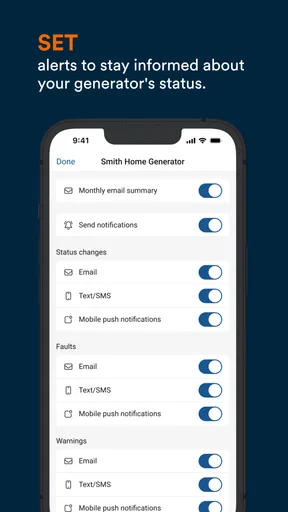
One of the features I absolutely love is the real-time alerts. Imagine being notified instantly if your generator is running low on fuel or needs maintenance. It gives you peace of mind, especially if you're relying on it for essential power supply.
The app also allows for remote testing. You can start or stop your generator directly from the app. It’s perfect for those moments when you want to ensure everything is functioning correctly without having to step outside.
Another cool feature is the maintenance scheduling. You can set up reminders for oil changes or other checks, ensuring your generator is always in top notch condition. Trust me, it saves a lot of hassle and prevents those annoying last-minute rushes to fix things.
User Experience
Using the app feels intuitive. The design is clean, and navigation is a breeze. Even if you’re not the most tech-savvy person, you’ll find it easy to use. The developers clearly put thought into making it user-friendly.
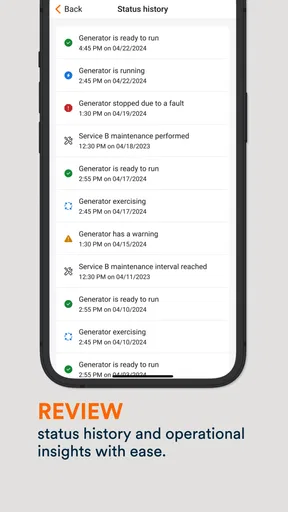
The app also boasts a history log of your generator’s performance. This can be incredibly helpful for troubleshooting or when you need to provide information for servicing.
Connectivity and Compatibility
One thing to note is that the app requires a stable internet connection to work seamlessly. It uses Wi-Fi to connect to your generator, so make sure your network is strong. In my experience, a good connection made a big difference in how smoothly the app operated.
For a remote check to be useful, I need to think about the whole connection path rather than just my phone. If the generator’s connection is unreliable, or the phone has poor service where I am, a status view may not be current when I most want it. I would treat the app as a convenient way to check in, not as a guarantee that every alert will arrive at exactly the right moment. When planning for an outage, it is sensible to know how I will check the equipment if the network is unavailable.
Making the routine work for you
A simple habit can make the information more actionable: choose a regular time to glance at the status, then use the history log when something looks different from the previous check. This is more useful than opening the app repeatedly without a question in mind. For example, after a test, I might note whether the generator’s status appears normal and whether any maintenance reminder needs attention. If I later contact a service professional, a clear description of what I saw and when can help make the conversation more focused.
Alerts are easiest to use when I know what I intend to do after receiving one. I would distinguish a reminder that calls for routine follow-up from a status that suggests I should investigate promptly, rather than treating every notification as equally urgent. Keeping the phone’s notification settings in mind is part of that workflow: if alerts are silenced or buried, remote monitoring becomes less useful. I would also avoid assuming that a notification replaces a hands-on check when the situation calls for one.
Remote start and stop controls call for a little more care than simply viewing status. I would use them only when I understand the generator’s surroundings and the action is appropriate, rather than treating remote operation as a shortcut in every situation. The practical advantage is that I can check or test without walking to the unit; the trade-off is that physical awareness still matters. A phone cannot tell me whether someone is nearby or whether the location is safe to operate in.
What it does better than a basic check
The usual alternative is to walk to the generator and read its status there, or to rely on memory and a paper maintenance note. Those approaches remain perfectly reasonable for equipment that is easy to reach and rarely needed. Mobile Link’s advantage is convenience at a distance: status information, alerts, and reminders can bring the check to the phone instead of requiring a trip to the unit. The app is not a general-purpose home-monitoring tool, though; its usefulness is tied to a compatible generator and to the information that setup makes available.
Compared with a calendar reminder alone, the app can bring generator status and maintenance prompts into the same routine. A calendar may still be better for someone who wants a simple date-based nudge and has no interest in remote checks. Likewise, a direct inspection is preferable when I need to confirm a physical condition that a phone view cannot show. I see these options as complements, not substitutes: the app can help me decide when to act, while records and inspection handle tasks that require more than a remote glance.
Limits worth understanding before relying on it
The app is free to download, but in-app purchases are listed from $3.39 to $149.99 per item, so I would review any purchase details shown in the app before committing. The average rating is 4.5 from around 20,000 ratings, with about 3,300 written reviews, and it has over 100,000 installs. Those figures suggest many people have tried it, but they cannot tell me whether my particular generator, network, or routine will be a good fit.
It is rated for Everyone, runs on operating system version 12 or later, and the current version is 3.14.0. It has been available since February 26, 2014. For a prospective user, the operating-system requirement and generator compatibility are the concrete checks to make before setting expectations. If I use an older phone, or my equipment is not supported, the app is not the right solution even if remote monitoring sounds useful.
Someone who wants an app to control unrelated household devices, replace a service visit, or provide a dependable connection where internet access is poor should look elsewhere or rely on direct checks instead. The strongest fit is narrower and clearer: a person with compatible Generac equipment who values remote status information and can maintain a usable connection. That focus is a strength, but it also means the app has little to offer someone without the right generator setup.
Connectivity and Compatibility
Compatibility-wise, it works with a variety of generators. It’s worth checking the specifics to ensure your model is supported, but most modern generators are covered.
Wrapping Up
Overall, Mobile Link for Generators is a game-changer for anyone who relies on a generator. Whether you're a frequent camper or just want to be prepared for power outages, this app provides incredible convenience and control. The peace of mind knowing you can check on things from afar is priceless.
So, if you haven’t already, give it a try. It might just become one of those essential apps you wonder how you ever lived without. Stay powered up and stress-free!
My verdict after weighing the trade-offs
I would recommend Mobile Link to someone who already has compatible equipment and wants a straightforward way to check on it without always going outside. Its best use is not constant supervision, but a reliable habit: check status when it matters, pay attention to maintenance prompts, and use the history as context if a question comes up. That gives the app a clear role in generator ownership without asking it to do more than remote monitoring can.
I would skip it if I could not confirm compatibility, needed it to work independently of a dependable connection, or simply preferred to inspect a nearby generator myself. For the right owner, though, it can make routine checks less inconvenient and help keep generator care on the household’s radar. That practical balance—not a promise that an app can solve every generator problem—is why I think it is worth considering.
Pros
- Easy remote monitoring of generator status.
- User-friendly interface with intuitive navigation.
- Real-time alerts for maintenance and issues.
- Compatible with various generator models.
- Secure login and data encryption.
Cons
- Requires stable internet for optimal performance.
- Limited offline functionality.
- Subscription fees for premium features.
- Initial setup can be time-consuming.
- Occasional notification delays.
FAQs for Mobile Link for Generators
What is Mobile Link for Generators and how does it work?
Mobile Link for Generators is an app that allows you to monitor and manage your standby generator from anywhere. It connects to your generator via Wi-Fi or cellular data, providing real-time updates on its status, maintenance needs, and any alerts. This ensures you’re always informed and can take timely action if needed.
Is Mobile Link for Generators compatible with all generator models?
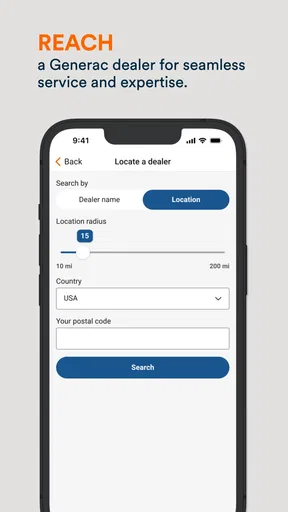
The app is compatible with a wide range of Generac generators, but not all models. It's crucial to check the manufacturer’s specifications or the app's official website to ensure compatibility. This will save you from potential connectivity issues and ensure seamless integration with your generator.
Does using Mobile Link require a subscription or any additional fees?
While downloading the Mobile Link app is free, some features may require a subscription. This includes advanced monitoring capabilities and the ability to access detailed reports. Always review the app’s pricing details to understand what features are included with a free download versus those requiring a subscription.
How secure is the Mobile Link app in terms of data privacy?
Mobile Link prioritizes data security by using encryption protocols to protect your information. However, it’s important to regularly update the app to the latest version to benefit from security enhancements. Reviewing the app’s privacy policy will provide additional insights into how your data is handled and protected.
What should I do if the Mobile Link app isn’t connecting to my generator?
If the app fails to connect, first ensure your generator and device are on the same network. Check for any network issues or interference. Restart both the generator and the app, and consider consulting the app’s troubleshooting guide. If problems persist, contacting customer support for assistance is recommended.


